According to my Photo library, I began crafting this dataset in September 2022. My goal was simple: build a rich, labelled dataset of (almost) all bike parking in Halifax, Nova Scotia, with a dated photo of each spot.
The city of Halifax already had a dataset, named Bike Amenities, but I felt it was sparse. It didn’t capture all the spots. It did have quality labels (type of spot, capacity), but when I’m parking my bike, I want to have a “feel” for the spot, usually that needs a photo! It also wasn’t especially intuitive for casual users. I wanted someone who typed “bike parking halifax” into a search engine to land on a clean, friendly map, not a dataset download.
I have long enjoyed the urban landscape. I grew up mostly in the urban core of Toronto, both as a child and an adult (immigrating into the city and returning in adulthood). I’ve always been fascinated by the organic nature of a city. It grows and regresses in various ways around you. There’s always something to observe and take note of! As well, I’ve been running now for about five years, so this project was the right blend of my joy for running, cycling, and our urban spaces. Now I had to think of how I could achieve it!
To make the map useful, I set one simple rule: every mapped node required a photo, so it began with that: What metadata is available on a photo taken with my iPhone?
I found a tool named dogsheep-photos, written by the ever-productive Simon Willison. It’s the Apple Photos app itself which is well praised in one of his blog posts, highlighting its capabilities, but most interestingly, sharing his discoveries of what lurks within its SQLite database: rich metadata, model-driven labels, any tags & keywords from Apple Photos, identified addresses, and more.
I thought at first I could perhaps get away with machine-labelled bike data. I could just run around, take photos, and be done! The machines do the rest! Turns out, it wasn’t that simple. The model-driven tagging was not as rich, or accurate as I wished, and it did not make distinctions between a ring post, corral, could not identify capacity, and to top it off: the infrastructure in Halifax is wildly inconsistent. I had the EXIF data to get the essentials (eg location/date), but lacked the specific information related to bike parking.
So, I went down to the basics: I can just tag the photos! There’s at most 1,000 bike parking spots to photograph (a spot may have a capacity greater than one, of course), and I could easily label all those spots. A few minutes of work after each run! As well, I could perhaps use these then-labelled photos to fine tune a model, so that I could eventually have something well built for identifying bike parking spots from photos. (note: I’ve not done this yet, but it’d be a fun project!)
Then, I got to running, starting in the Spring Garden area of the downtown core. After each run, I’d pop open Photos and tag each photo I took
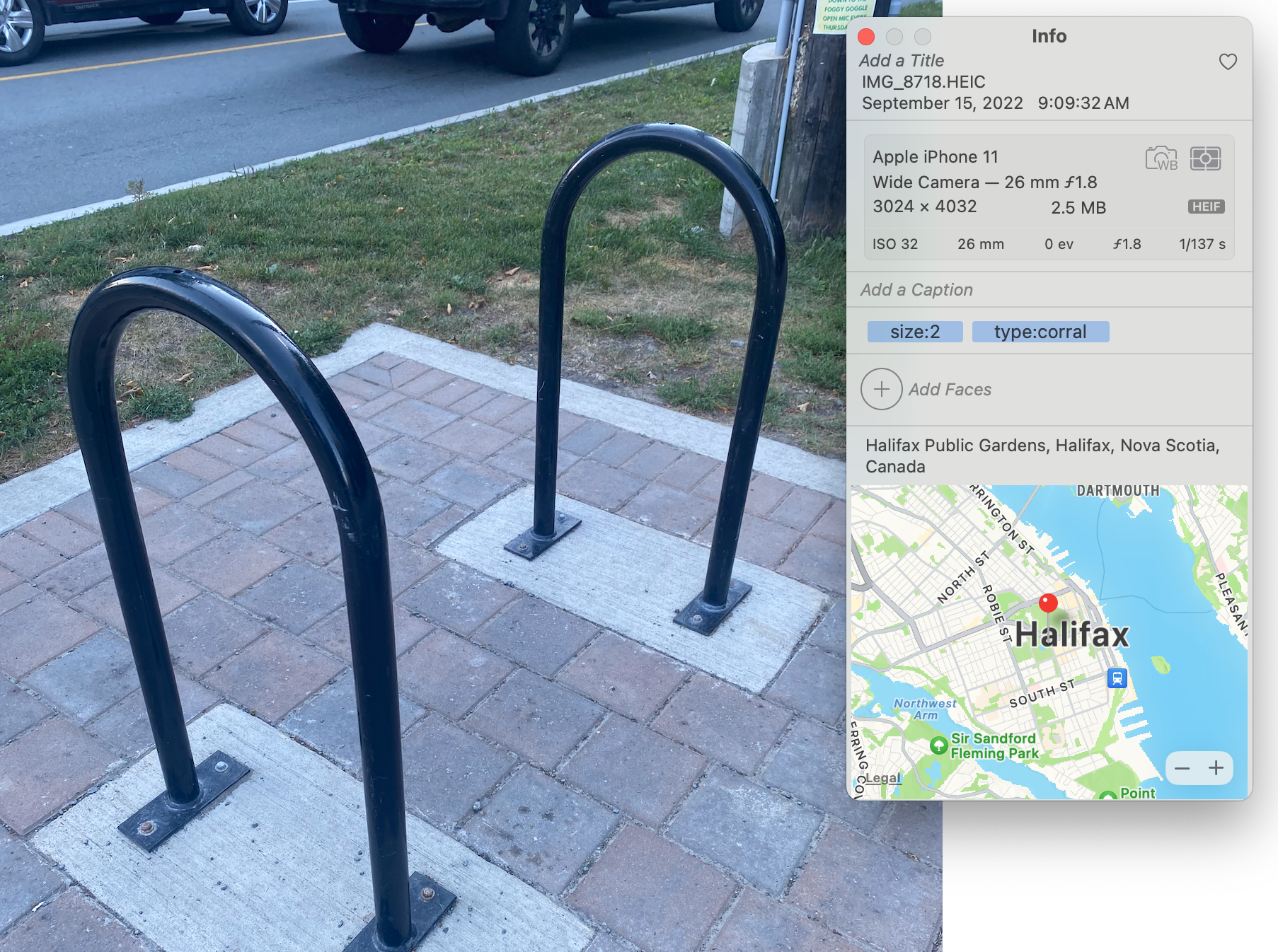
I’d pop these into an album, run dogsheep-photos to create an SQLite database of my Apple Photo data, and then use a simple Python script which reads the sqlite database, executes a few assertions so my data remains clean, and uses the EXIF and labelled data to create a GeoJSON FeatureCollection. The pipeline for mapping was simple:
from collections import namedtuple
import ast
import json
import os
import sqlite3

# This script queries the Apple Photos database and returns a GeoJSON
# FeatureCollection.
#
# First, obtain the photos.db
# > dogsheep-photos apple-photos photos.db
# Then, set the ALBUM environment variable and run the script
# > ALBUM="hfxbikeparking" python dogsheep/fetch.py > hfxbikeparking.geojson
album_name = os.environ.get("ALBUM")

RowData = namedtuple('RowData', [
    'sha256',
    'uuid',
    'burst_uuid',
    'filename',
    'original_filename',
    'description',
    'date',
    'date_modified',
    'title',
    'keywords',
    'albums',
    'persons',
    'path',
    'ismissing',
    'hasadjustments',
    'external_edit',
    'favorite',
    'hidden',
    'latitude',
    'longitude',
    'path_edited',
    'shared',
    'isphoto',
    'ismovie',
    'uti',
    'burst',
    'live_photo',
    'path_live_photo',
    'iscloudasset',
    'incloud',
    'portrait',
    'screenshot',
    'slow_mo',
    'time_lapse',
    'hdr',
    'selfie',
    'panorama',
    'has_raw',
    'uti_raw',
    'path_raw',
    'place_street',
    'place_sub_locality',
    'place_city',
    'place_sub_administrative_area',
    'place_state_province',
    'place_postal_code',
    'place_country',
    'place_iso_country_code',
])

valid_types = [
    'Ring',
    'Corral',
    'U Ring',
    'Ring Corral',
    'Wave Corral',
    'Wheel Slot Corral',
    'Triangle Corral',
    'Hanging Corral',
    'Ornamental',
    'Locker',
]

def query_database(db_file):
    assert album_name is not None, "ALBUM environment variable must be set."

    with sqlite3.connect(db_file) as conn:
        conn.row_factory = sqlite3.Row
        cursor = conn.cursor()

        query = "SELECT * FROM apple_photos WHERE albums = ?"
        cursor.execute(query, (json.dumps([album_name]),))

        features = []
        for row in cursor.fetchall():
            f = create_feature(RowData(*row))
            if f:
                features.append(f)

        feature_collection = {
            "type": "FeatureCollection",
            "features": features
        }

        geojson_blob = json.dumps(feature_collection, indent=2)
        print(geojson_blob)

def create_feature(row: RowData):
    keywords = ast.literal_eval(row.keywords)

    # Photos without a type: are likely untagged and should be resolved.
    hasType = False
    for kw in keywords:
        if kw.startswith("type:"):
            hasType = True
            break
    assert hasType, f"Photo on {row.date} does not have a type: keyword."

    filename = row.original_filename.rsplit(".")[0] + ".jpeg"
    properties = {
        "description": row.description or "",
        "filename": filename,
        "date": row.date,
    }

    for kw in keywords:
        if kw.startswith("size"):
            properties["Size"] = int(kw.split(":")[1])
        if kw.startswith("type"):
            p = kw.split(":")[1]
            properties["Type"] = p.title()
            assert p.title() in valid_types, f"Photo on {row.date} has invalid type: {p}"


    return {
        "type": "Feature",
        "geometry": {
            "type": "Point",
            "coordinates": [row.longitude, row.latitude]
        },
        "properties": properties,
    }
Although much of it is unused, I keep the full RowData structure around as a reminder of what else I could explore. It’s primarily for obtaining the human-tagged keywords and location data! After labelling data after each run, I’d run the script, pipe the standard out to a file, and publish it to the GitHub repository. The data is published in GeoJSON format and can be used by anyone.
Over time, I developed a sense of categories. In Halifax, the parking situation can be wildly inconsistent. We’re used to rusty corrals not attached to any concrete foundation, musical note shaped “decorative” parking, corrals tucked beneath concrete structures (?!), corrals which clearly won’t fit any actual bike, rings clearly damaged by large vehicles, and …
*exhales*
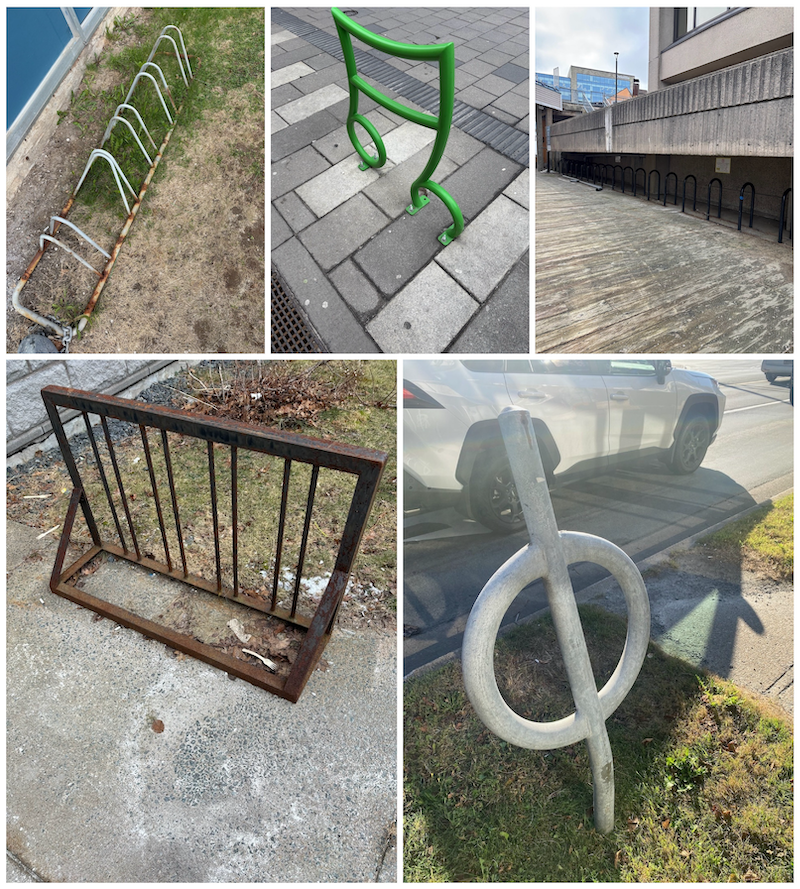
Yes, it’s a bit messy out there! As cyclists, all we want is a standard “U” shaped corral with reasonable spacing and near amenities. One quality corral for several bikes taking up as much, often times less, space than a single parking spot.
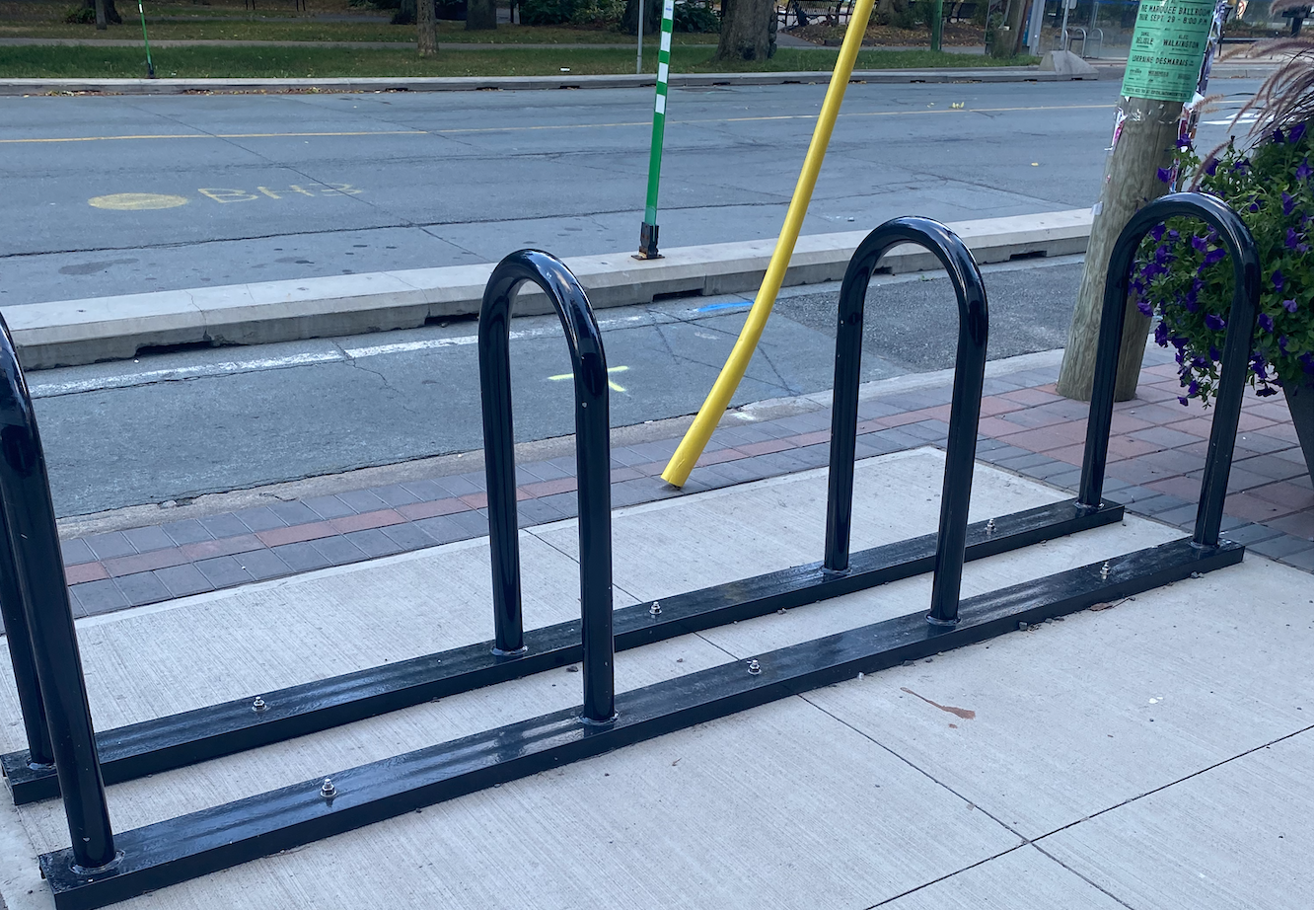
So, I had to be strict with my categorization. I wanted to have 5-7 categories I could slot most parking into, eventually I had to add some interesting categories like “Hanging Corral” (the bikes hang, yes), and “Locker” (longer-term bike storage, neat!) After enough data collection and some help from Claude to make a Leaflet map, I had my map!
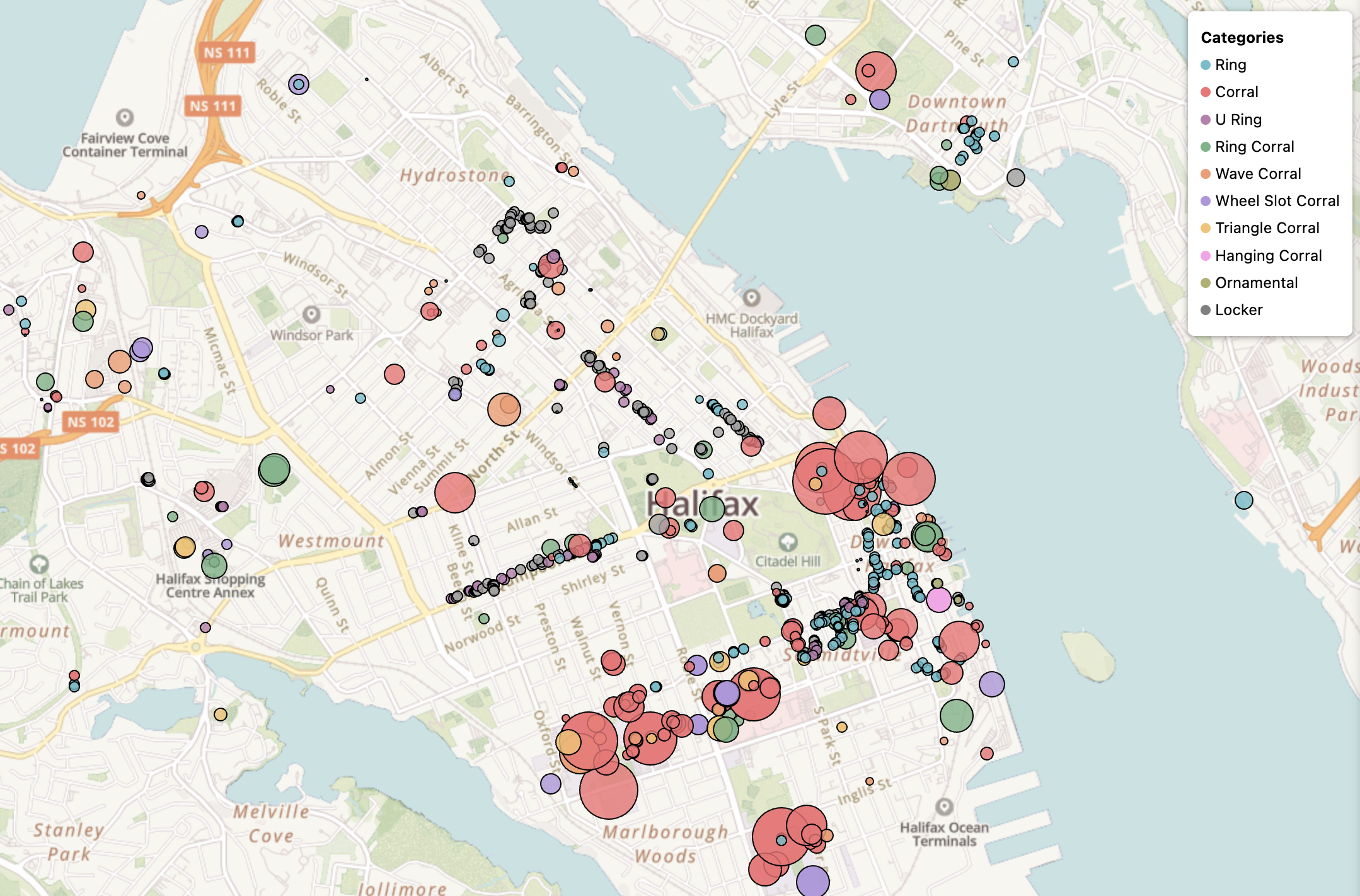
Of course, that’s a snapshot of today’s representation, after many logged runs through the city and tweaks to my data. I’m no mapping expert, but I think it turned out OK. I like the colours, the bubbles growing with parking capacity, and the map does a decent job of visualizing where our retail corridors exist, and I think you can guess where the universities sit! It was also interesting to me that Halifax really lacks in-neighbourhood retail. If you’re heading to the north North End on bike, you’re likely going to a friend’s place. There’s not much retail to visit, and what does exist seems to lack any place to park your bike.
Collecting this data also confirmed perhaps the obvious, that the suburbs of Halifax are not going to be bike friendly. Spryfield, for example, is an excellent place to live if you love recreational mountain biking, running on trails, and well, being out in the woods! There’s also some excellent retail, but unfortunately much of it in 80s-style, car dominated shopping centres with minimal bike parking. Here, we can observe at most 12 spots across a large land area:
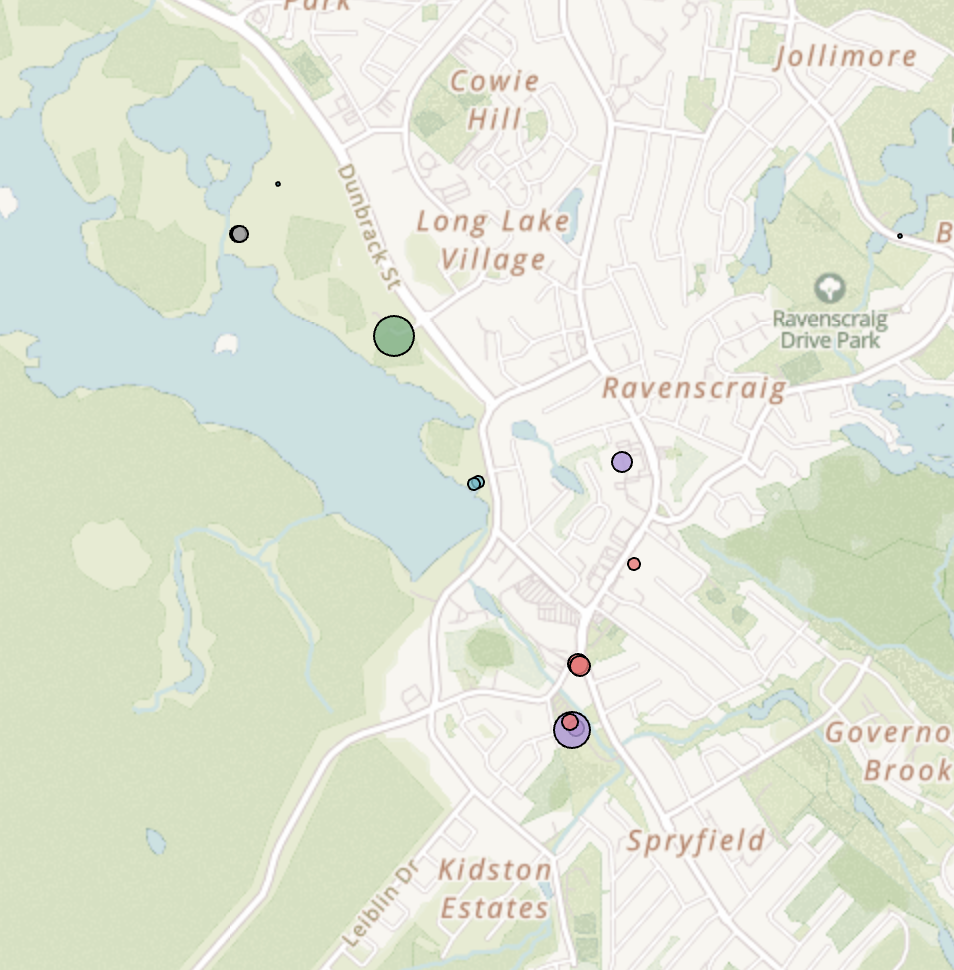
If I was riding my bike down here, I’d need to do additional planning to understand where I can safely park my bike. Cars, of course, don’t have this problem. There’s ample parking spots to be had! I will give credit where it’s due, as it was interesting to find bike parking within Long Lake Provincial Park, not just at the entrance (those nodes in the top left)
As the map developed, I identified the gaps and ran to those places. My kids got involved (“Dad look! A parking spot!”, “Do you have that one?!”), had interesting journeys trying to sort out how to get to Africville Park on foot, crossed the bridge a few times to map downtown Dartmouth, and decided “Yeah, why not, let’s throw the four parking spots in Musquodoboit Harbour on that map! It might be helpful to someone!”
This project began with a simple goal: a beautiful map, and an initially technical approach leveraging machine-identified data, but in the end it’s a lot of running around, several hundred photos, and a few lines of Python. I do not yet have every bike parking spot mapped, but the project grows organically, shaped from my days. It’s simple, easy to pop back into, and perhaps I’ll indeed use the labelled data for something interesting in the future.
I’ve received a few emails from folks, mainly those who are coming from Dartmouth into Downtown Halifax. They thank me for the map and say it helped their journey. Selfishly, the map has been as much for me as perhaps it is for others. I’ve checked it ahead of heading out on my bike, but the mild gamification of trying to catch them all is a sort of urbanist joy that I’ll treasure. As of late, I have my sights set on Bedford West, a developing medium-density neighbourhood setting itself up well with retail, transit, and attractive amenities like pump tracks. It’s a good excuse to explore someplace new.
So, if you see a 5’6” dude with a short beard, wearing his running sneakers and a Halifax Hares sweatshirt, awkwardly taking photos of what appears to be the sidewalk, that’s me! Say hi. See you out there.